Key takeaways
- Target words people buy with, not just words people search.
- Collect real buyer phrases before opening any keyword tool.
- Filter hard: specific, commercial, and a match for what you sell.
- Check page one and only chase keywords you can beat.
- Score your shortlist and pick three to five keywords.
On this page
- Why most keyword research misses the buyers
- What "buyer intent" actually means
- Step 1: Start with buyer problems, not keywords
- Step 2: Expand your list, then filter it hard
- Step 3: Check who you'd be up against
- Step 4: Score your shortlist and pick three to five
- A worked example, start to finish
- The honest catch: it takes time
- Where the Keyword Research Tool fits
- Frequently asked questions
- Start free, then decide
Why most keyword research misses the buyers
Most keyword research fails because it targets words people search, not words people buy with.
A beginner types a broad phrase into a tool, picks whatever has the biggest number next to it, and writes a post. Months later the post sits on page six, or it ranks and brings visitors who were never going to buy anything. Both outcomes come from the same mistake: chasing volume without asking what the searcher wants to do next.
This guide walks through a four-step method for finding buyer-intent keywords, meaning searches typed by people who are comparing options, looking for a specific solution, or ready to act. Every step works with free tools. Near the end I'll show where a paid tool can save time, and be clear about who should skip it.
What "buyer intent" actually means
Buyer intent describes how close a searcher is to a purchase or a decision, and you can usually read it from the words they use.

Modifiers give the intent away. Words like best, vs, review, template, checklist, for [audience], price and download usually signal a searcher who is further along. For a site that sells digital products, commercial and transactional keywords are where the money is. Informational keywords still earn their place, because they bring in readers you can move toward the commercial pages with good internal links.
Step 1: Start with buyer problems, not keywords
The best commercial keywords come from the exact words buyers use to describe their problem, so collect those before you open any keyword tool.
If you're still choosing a niche, read How to Find a Profitable Niche for Digital Products first. Once you have one, spend an hour gathering real phrases from these places:
- Reddit and Quora: search your niche and note how people phrase questions and complaints.
- Amazon reviews: read the three-star reviews of competing books and products. They often say what the buyer wished was included.
- Google's "People Also Ask" boxes: search your seed topic and write down the related questions.
- Comment sections and forums: look for repeated frustrations and "is there a tool that..." questions.
Paste every phrase into a spreadsheet exactly as written, without cleaning it up. Aim for 20 to 30. Buyers rarely use the polished terms a marketer would pick, and those raw phrases are your seed list for the next step.
Step 2: Expand your list, then filter it hard
Expanding is easy and filtering is where the skill lives, so use free tools to widen the list and a short rulebook to cut it.
To expand, take each phrase from Step 1 and run it through free sources:
- Google autocomplete: type the phrase followed by each letter of the alphabet and record the suggestions.
- Related searches: scroll to the bottom of the results page and note what Google offers.
- Google Keyword Planner: free with a Google Ads account, and useful for grouping ideas and comparing relative demand.
- Google Trends: compare two or three candidate phrases to see which is growing.
- Other platforms: check autocomplete on YouTube and Amazon too, because buyers phrase things differently there.
Then filter. Keep a keyword only if it passes all four checks:
- It matches something you actually sell or could sell.
- It is specific, usually three or more words.
- It carries a commercial or transactional modifier from the table above, or a clear problem the product solves.
- You could answer it fully in a single page or post.
Expect to cut most of a long list. That is the goal.
Step 3: Check who you'd be up against
A keyword is only worth chasing if page one looks beatable, so search each survivor and read the top results like a competitor would.
Open the first page in a private window and judge each of these signals:
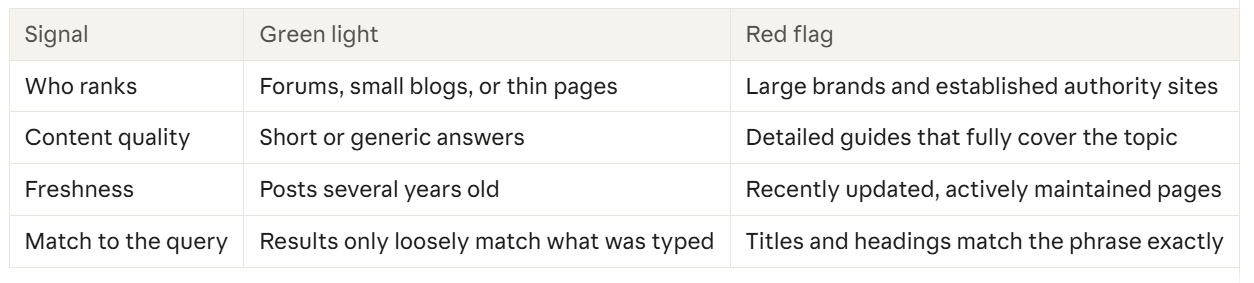
A keyword with two or more green lights goes forward. One with mostly red flags gets parked, not deleted, because you may be able to return to it once your site has more authority. Never skip this step: a keyword with great buyer intent and a wall of strong competitors is a keyword you will not rank for.
Free guide
How to sell digital products
See how keywords fit into the rest of your selling plan.
Read the free guide →Step 4: Score your shortlist and pick three to five
A simple scoring sheet turns gut feeling into a ranked list you can act on.
Score each remaining keyword from 1 to 5 on the four criteria below. For competition, 5 means weak competition. Add the scores and start with the highest totals.
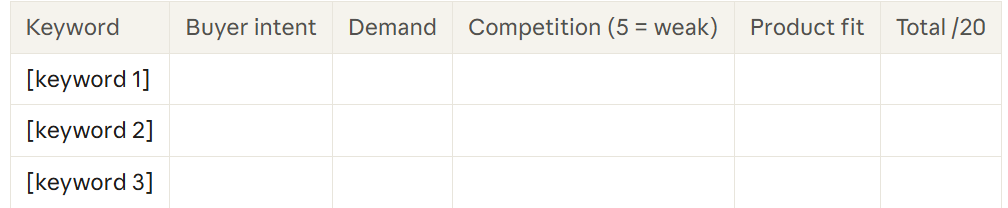
Two rules keep the sheet honest. First, give demand a score relative to your other candidates, since you are ranking your own list, not judging absolute numbers. Second, check for overlap before you commit. If two keywords would be answered by the same page, choose one, because two posts chasing the same search compete against each other instead of your rivals.
A worked example, start to finish
I used my keyword tool plus a free option from Ahrefs to show you how this works. I am not suggesting that these keywords phrases are going to be profitable for you. This is for educational purposes only. I can't promise or guarantee success if you use these tips or tools. Disclosure: I will earn compensation if your make a purchase by clicking on these links and going to my store.
The keyword phrases I used are: the best diet pills, best diet pills and diet pills for women. I have added screenshots from Reddit reviews and Amazon Reviews. I have also included screens shots from Ahrefs and my long-tail keyword tool.
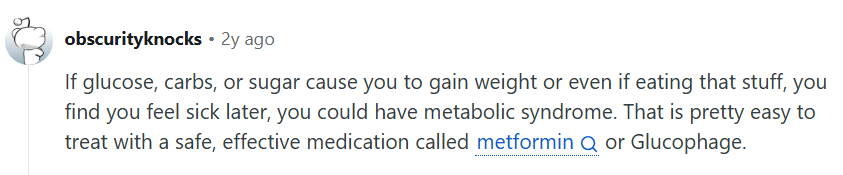

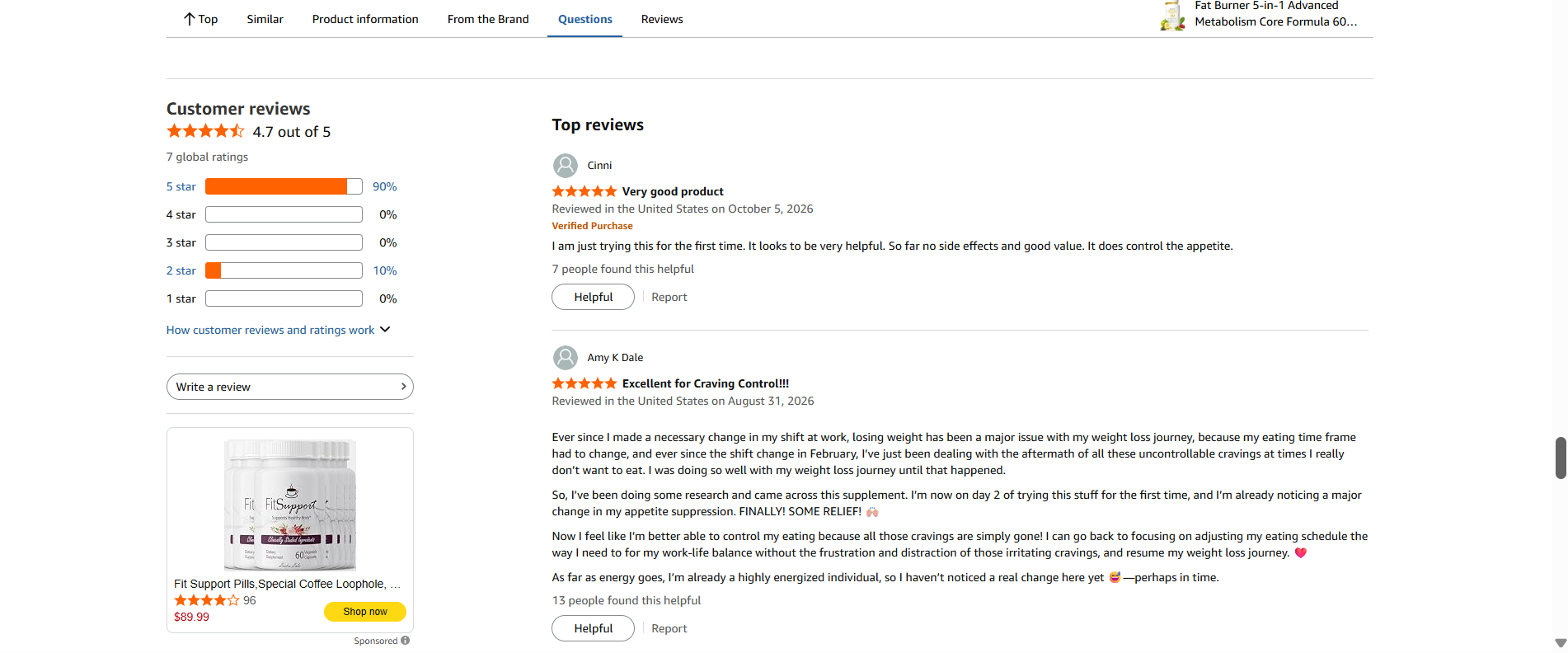
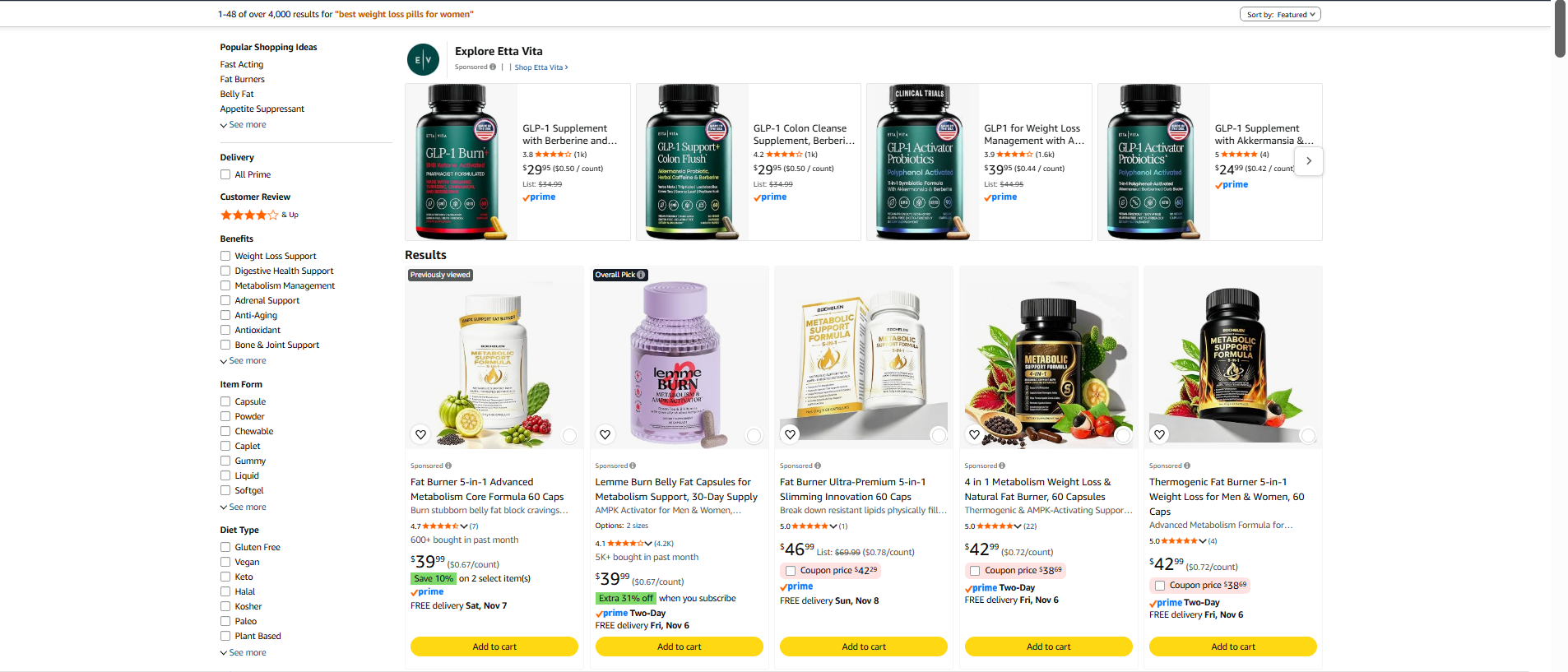
Let's say you wanted to sign up for Amazon Affiliate Program. As you can see, there are quite a few supplements that are recommended when you type in best weight loss pills for women on Amazon. You can create a review post for each supplement listed. That means no matter which one someone chooses to buy you will still earn a commission.
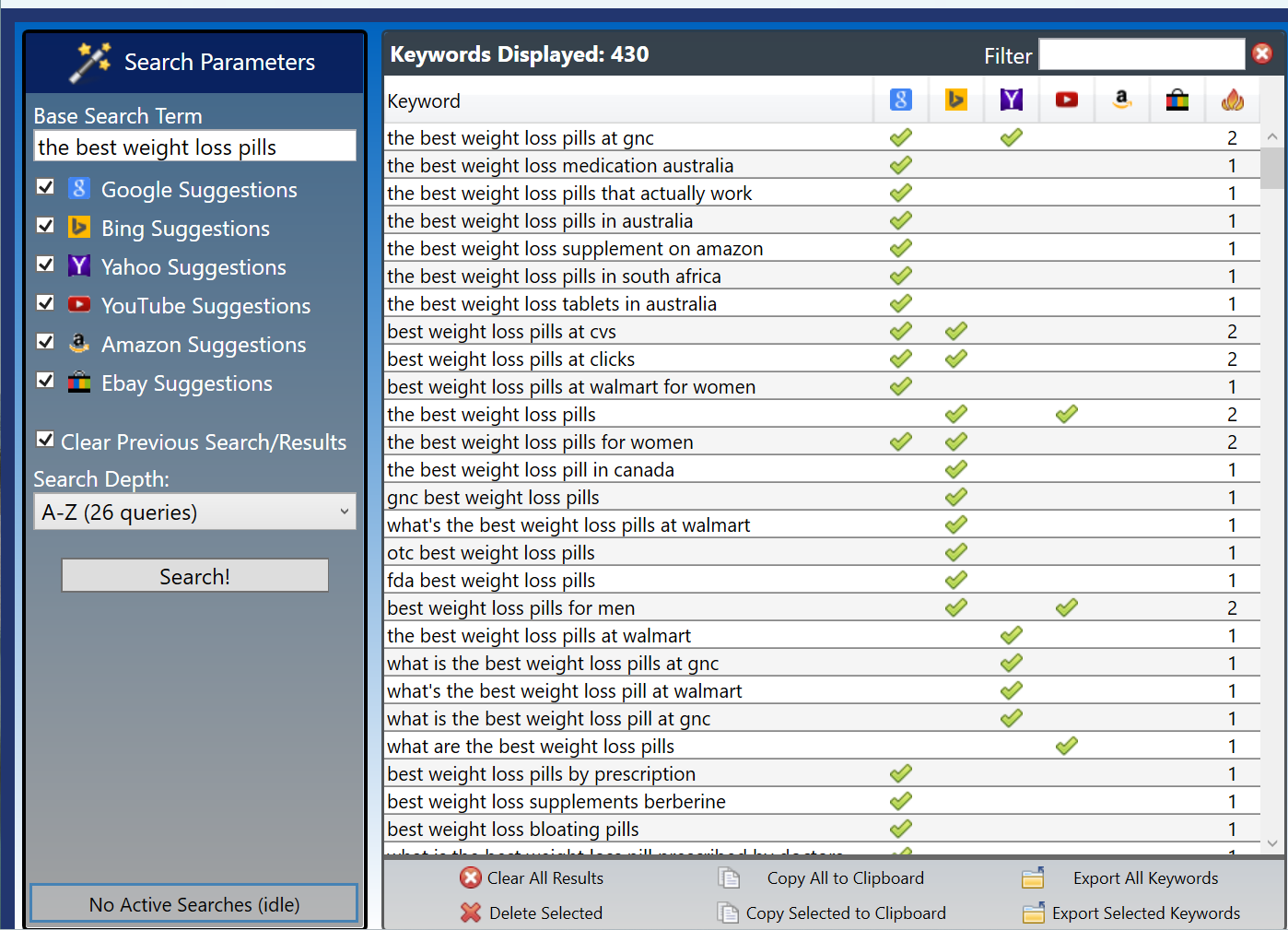
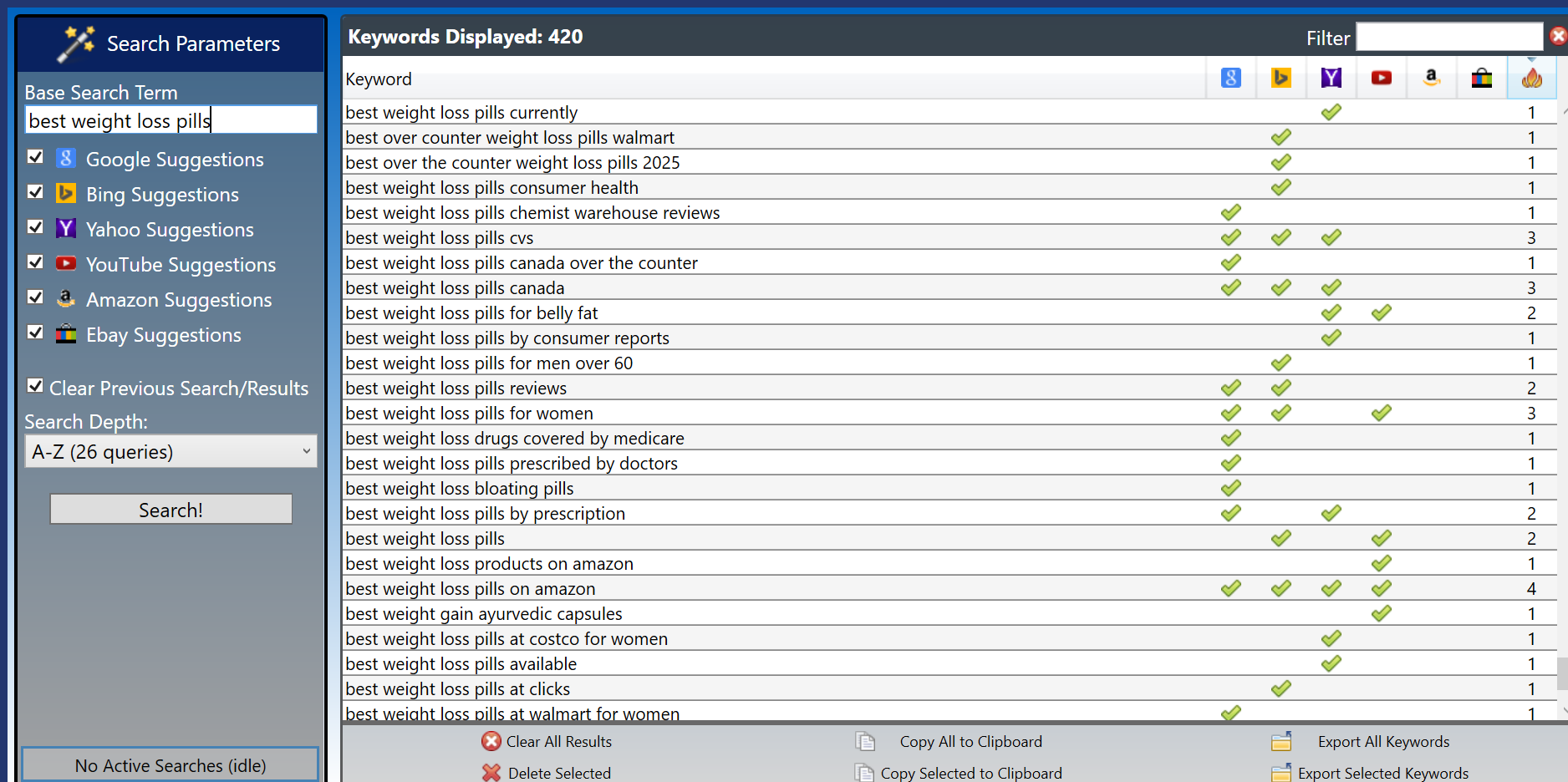
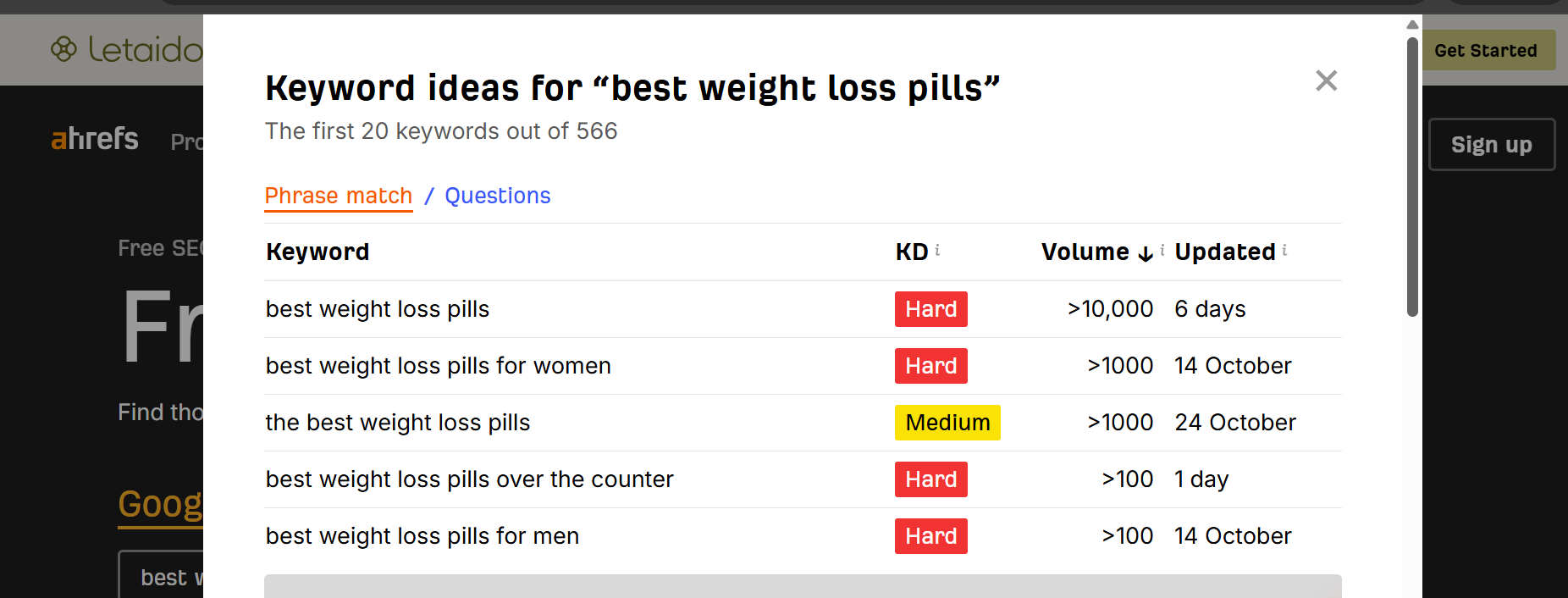
I used my tool for the best weight loss pills keyword phrase. I ended up finding a low competition phrase the best weight loss pills. I checked it on Ahrefs and as you can see best weight loss pills and best weight loss pills for women are hard to rank for but the best weight loss pills have medium competition. The demand ranking number came from my keyword tool. It lists the cross site popularity of a keyword phrase from 1-4. This shows you actual longtail keyword phrases people are looking for when they are ready to buy.

You can see in the above score card what my final results are. The longtail keyword phrase the best weight loss pills came out on top with the most points. If this were my niche, I would keep looking to find two more phrases that had low competition. I would get rid of best weight loss pills and best weight loss pills for women.
The honest catch: it takes time
The four steps above work and cost nothing, but they cost hours, and the hours multiply every time you add a niche.
Each seed idea means visiting several sites, copying phrases into a sheet, and repeating the process for every platform where your buyers search. Google, YouTube and Amazon each show different suggestions, so skipping one means missing keywords. If you are researching a single niche for a single site, that time is a fair price and you may never need anything more than a spreadsheet.
The pressure builds when you research many niches, launch products regularly, or serve several audiences. That is the situation where a dedicated tool can pay for itself in saved time, and where the next section applies.
Where the Keyword Research Tool fits
The Keyword Research Tool is Windows software that speeds up the discovery stage (Step 2) by querying six search engines at once, and it costs $119.
What it does. You enter a base keyword, choose which of six sources to query (Google, Bing, Yahoo, YouTube, Amazon and eBay), and click Search. The results include a Cross-Site Popularity score, is a quick indicator of how popular a keyword is across those sources.
What's included. Keyword Research Tool and two bonus guides:
- Meta Title & Description Formula Sheet: character and pixel limits, formula categories, a power-words swipe file and a pre-publish checklist for meta tags.
- Keyword Cannibalization Audit & Remediation Guide: how to find keywords that compete against your own pages, a matrix matching common scenarios to fixes, step-by-step remediation workflows and a checklist to prevent it recurring.
The cannibalization guide lines up with the overlap rule in Step 4, and the meta title sheet helps once you've chosen keywords and are writing the page.
Where your own work still matters. Judging competition (Step 3) and scoring your shortlist (Step 4) still take your own eyes on page one. The tool is built to find keywords and compare their popularity, not to decide which ones you can win.
Check these before you buy
- Windows Operating Systems only.
- No refunds. All sales are final and non-refundable once access is delivered. Run the free method in this post first, so you know the work it would speed up.
- No ranking promises. The terms say there is no guarantee of rankings, traffic or revenue from using the tool.
- Single license. It covers personal or internal business use, and the terms prohibit reselling, sublicensing and sharing login credentials.
Who it's for, and who should skip it
It fits you if you research keywords across several niches or platforms, you've done the manual method and found it slow, and you work on Windows.
Skip it if you're researching one niche, you use a Mac, you want to try before paying, or you haven't yet run the four steps by hand. If the manual process feels fine, you don't need the tool yet.
Why I use it, and why I think it’s worth $119
I use the Keyword Research Tool all the time when I plan blog posts, mostly to find long-tail keywords. I enter a base phrase, choose which of the six sources to search (Google, Bing, Yahoo, YouTube, Amazon and eBay), and compare the results using the Cross-Site Popularity score. Seeing all six sources side by side matters, because buyers phrase things differently on each one, and checking them by hand one at a time is slow.
What it replaces. It covers the slowest part of the free method above: running autocomplete and related searches on each platform, then copying everything into a spreadsheet. The tool does that discovery in one place, so I spend my time on Steps 3 and 4, judging the competition and scoring the shortlist.
How it compares.
Free tools are fine for one niche, but they usually show you one source at a time. Cheaper niche-research products are often ebooks, idea lists or prompt packs. This is software you run yourself, so you can research any niche you like instead of working from someone else’s list.
The price is a one-time $119. There’s no monthly fee, so the cost doesn’t keep building the longer you use it. If you publish regularly, it’s a single purchase you use for every post.
The bonuses are useful too. The Keyword Cannibalization Audit & Remediation Guide helps once you’ve published many long-tail posts and need to make sure they aren’t competing against each other. The Meta Title & Description Formula Sheet helps you write the title and description once you’ve picked a keyword.
Know the limits before you buy. It runs on Windows only, all sales are final, and no tool can promise rankings. It finds and compares keywords, but you still have to check page one and decide which ones you can win.
Frequently asked questions
Does the Keyword Research Tool work on a Mac?
The listing shows Windows as the operating system. [Confirm Mac and Linux status and update this answer.]
Can I get a refund?
No. The store terms say all sales are final and non-refundable once access is delivered, so decide before you buy. Running the free four-step method first is the safest way to find out whether you need it.
What do I receive?
The listing shows three files (PDF and ZIP, 20.8 MB), and the page describes the tool plus two bonus guides: the Meta Title & Description Formula Sheet and the Keyword Cannibalization Audit & Remediation Guide.
Will it get me ranking on Google?
No tool can promise that, and the store terms say there is no guarantee of rankings, traffic or revenue. The tool helps you find keywords. Rankings depend on the quality of the content you publish and the competition you face.
Can I use it for client projects?
The license is a single, non-transferable license for personal or internal business use. [Confirm whether client work counts, and answer accordingly.]
Is there a free alternative?
Yes. The four-step method in this post uses free tools only, and it works at any budget.
Start free, then decide
Run the four steps on one niche this week and let the experience tell you whether you need more.
Find the buyer's words, expand and filter, check page one, then score and pick. If you finish with a handful of keywords you can actually win, you've already done the hard part. If you finish thinking "this works, but I need to repeat it across many niches and it's eating my week," that is the moment the Keyword Research Tool makes sense, with the Windows requirement and the no-refund policy in mind.
Next steps: - Read the free guide to selling digital products to see how keywords fit into the rest of the plan. - When you're ready to speed up discovery, take a look at the Keyword Research Tool.
Recommended tool
Keyword Research Tool
Speed up keyword discovery across six search engines at once. Windows only.
See the Keyword Research Tool →This article is general information, not financial or legal advice. Results vary.